Quick Answers: Everything About UHR Payslip Access
Need your UHR payslip now? Here’s what you need to know immediately:
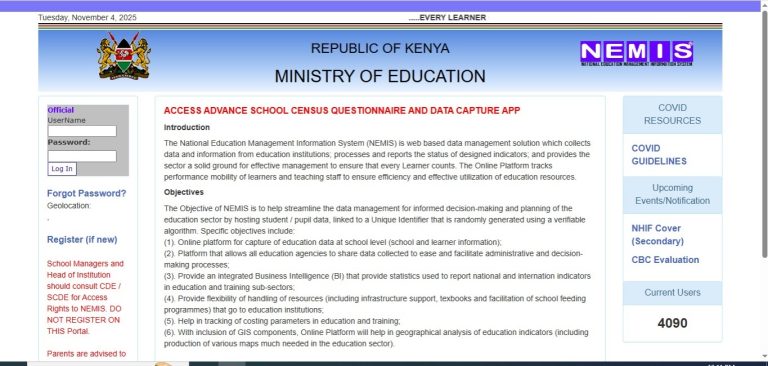
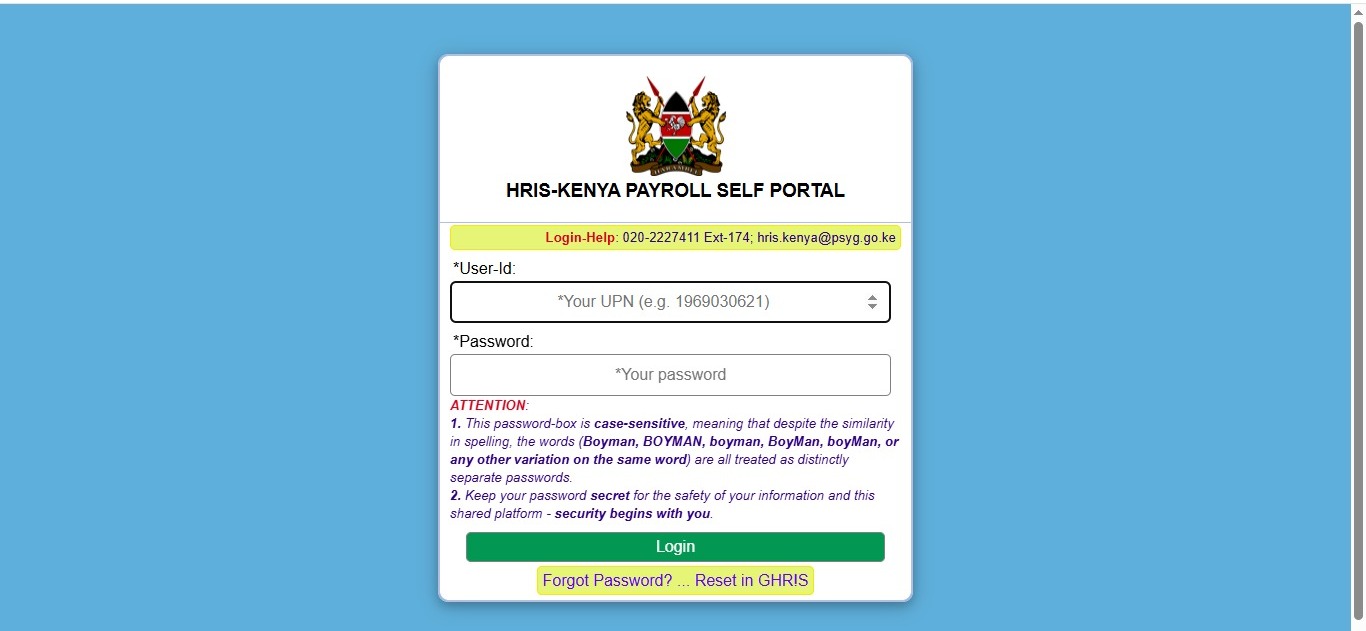
- Access Portal: Visit uhr.kenya.go.ke/ippd/auth/login.php
- Login Time: 2-3 minutes for first-time users, under 30 seconds for returning users
- Requirements: Employee number, password, and stable internet connection
- Cost: Completely free to access
- Availability: 24/7 online access to current and past payslips
- System: Replaced IPPD system in December 2024 with HRIS-Kenya Payroll System
Picture this: It’s the first Monday of the month. You’re sitting at your desk, cup of tea in hand, ready to check your salary. But instead of sifting through piles of paper or waiting in long queues at the HR office, you simply open your phone, tap a few buttons, and there it is – your complete payslip with every detail you need.
Welcome to the world of UHR payslips in Kenya. If you’re a government employee, this digital transformation has changed how you access your salary information forever. But here’s the thing: many Kenyan public servants still struggle with accessing their UHR payslip or understanding what all those numbers mean.
I’ve spent years helping government employees navigate this system, and I’m here to break it down for you in the simplest way possible. Whether you’re a teacher in Mombasa, a county employee in Kisumu, or a civil servant in Nairobi, this guide will show you exactly how to access, read, and use your UHR payslip.
What is UHR Payslip?
The UHR payslip is your official digital salary document issued by the Kenyan government. UHR stands for Unified Human Resource – a comprehensive online system that manages payroll for all government employees across Kenya.
Think of your UHR payslip as your monthly financial report card. It’s not just a piece of paper showing how much money landed in your account. It’s a detailed breakdown that tells you exactly where your hard-earned money comes from and where it goes.
The system is part of the broader GHRIS (Government Human Resource Information System), which has revolutionized how Kenya’s public sector manages employee information. Since December 2024, the IPPD system has been upgraded to the HRIS-Kenya Payroll System, with all payslips now available through the UHR Kenya Payroll Portal.
Your UHR payslip includes:
- Basic salary before any deductions
- All allowances (housing, transport, medical, risk allowances)
- Gross salary (total earnings before deductions)
- Statutory deductions (PAYE, SHIF, NSSF, Housing Levy)
- Voluntary deductions (loans, SACCO contributions)
- Net pay (your actual take-home amount)
Why Kenyan Government Employees Need UHR Payslip
Understanding your UHR payslip isn’t just about knowing your salary. It’s about taking control of your financial future. Here’s why every government employee in Kenya should master their payslip:
Financial Transparency Gone are the days when you’d receive your salary and wonder why the amount seemed different from what you expected. Your UHR payslip shows every shilling – what you earned, what was deducted, and why. This transparency helps you spot errors before they become bigger problems.
Loan Applications Made Easy Planning to buy land in Nakuru or get a mortgage for that house in Karen? Banks and online jobs in Kenya lenders require proof of income. Your UHR payslip serves as official documentation that shows your earning capacity and employment stability.
Tax Compliance The Kenya Revenue Authority (KRA) requires accurate tax records. Your UHR payslip automatically tracks your PAYE deductions, making it easier when tax season comes around. You can access your P9 form directly through the system for annual tax filing.
Budget Planning When you know exactly what hits your account each month, you can plan better. Maybe you’ll finally start that side hustle, or perhaps you’ll know you can afford to enroll your child in that private school you’ve been eyeing.
Record Keeping Need a payslip from three years ago? No problem. The UHR system stores your entire payroll history. Whether you’re applying for a visa, proving employment for insurance, or settling a financial dispute, your records are always available.
Types of UHR Payslips in Kenya
Current Month Payslip
This is your most recent salary statement showing this month’s earnings and deductions. Most employees check this payslip first when logging into the UHR portal.
Historical Payslips
Access any payslip from previous months or years. Useful for tracking salary progression, verifying past deductions, or providing documentation for various applications.
P9 Form
Your annual tax deduction certificate showing total earnings and PAYE paid throughout the year. Essential for filing tax returns with KRA.
Payslip for Specific Categories
Different government bodies may have slightly different payslip formats:
- TSC Teachers: Teachers Service Commission employees
- County Government Staff: County administration employees
- National Government Employees: Civil servants in ministries and departments
- Kenya Defence Forces: Military personnel
- National Police Service: Police officers
How to Access Your UHR Payslip Online: Step-by-Step Guide
Step 1: Prepare Your Credentials Before you begin, make sure you have:
- Your employee number (check with your HR department if you don’t have it)
- Your password (if it’s your first time, you’ll create one during registration)
- A working smartphone, tablet, or computer
- Stable internet connection
Step 2: Visit the Official Portal Open your web browser (Chrome or Firefox works best) and type: uhr.kenya.go.ke/ippd/auth/login.php
Be careful to use the official website only. There are fake sites that try to steal login information. Always verify you’re on the correct government portal.
Step 3: First-Time Registration (If Needed) If you’re logging in for the first time:
- Click on “New Employee” or “Register”
- Fill in your personal details:
- National ID number
- KRA PIN
- Employee number
- Official email address
- Phone number
- Create a strong password (use a mix of letters, numbers, and symbols)
- Verify your email and phone number
- Submit your registration
Step 4: Login to Your Account For returning users:
- Enter your employee number in the “User ID” field
- Type your password
- Click “Login”
Step 5: Navigate to Payslips Section Once logged in:
- Look for the “Payslips” or “My Payslip” tab on your dashboard
- Click on it to see available payslips
Step 6: Select Your Payslip
- Choose the month and year you want to view
- Click on “View” to see it on screen or “Download” to save a PDF copy
Step 7: Save Your Payslip
- Download the PDF to your device
- Save it in a secure folder labeled by month and year (e.g., “Payslip_November_2025”)
- Consider backing up important payslips to cloud storage
Pro Tips for Smooth Access:
- Use a secure internet connection (avoid public Wi-Fi)
- Log out after viewing your payslip
- Change your password regularly (every 3-6 months)
- Never share your login credentials with anyone
- Clear your browser history after using shared computers
Understanding Your UHR Payslip: Breaking Down the Numbers
Your payslip might look complicated at first glance, but it’s actually quite straightforward once you understand each section. Let me walk you through it like I’m explaining it to a friend over coffee.
Section 1: Personal Information
At the top of your payslip, you’ll find:
- Your full name
- Employee number
- National ID number
- Job title and job group
- Department or ministry
- Payment date
Section 2: Earnings Breakdown
Basic Salary This is your core salary as stated in your employment contract. For example, if you’re in job group K, your basic salary might be KSh 45,000 per month.
Allowances These are additional payments on top of your basic salary:
- House Allowance: Helps cover rent or housing costs (typically KSh 10,000-28,000 depending on job group)
- Commuter Allowance: Transport costs (usually KSh 4,000-8,000)
- Medical Allowance: Healthcare costs (varies by position)
- Hardship Allowance: For employees in challenging locations
- Risk Allowance: For positions with occupational hazards
- Leave Allowance: Annual leave entitlement payment
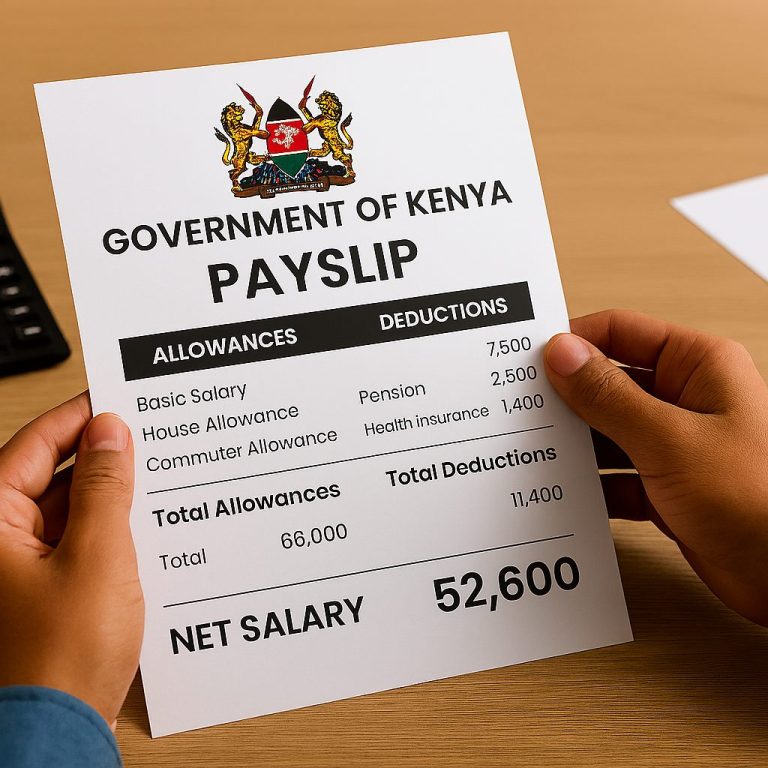
Gross Salary This is the total of your basic salary plus all allowances before any deductions. For example:
- Basic Salary: KSh 45,000
- House Allowance: KSh 15,000
- Commuter Allowance: KSh 6,000
- Gross Salary: KSh 66,000
Section 3: Statutory Deductions
These are mandatory deductions required by Kenyan law:
PAYE (Pay As You Earn) Your income tax based on KRA tax bands:
- 10% on monthly income up to KSh 24,000
- 25% on income between KSh 24,001 and KSh 32,333
- 30% on income between KSh 32,334 and KSh 500,000
- 32.5% on income between KSh 500,001 and KSh 800,000
- 35% on income above KSh 800,000
You get a personal relief of KSh 2,400 per month automatically applied.
SHIF (Social Health Insurance Fund) Replaced NHIF in 2024. You contribute 2.75% of your gross monthly salary with a minimum of KSh 300. For example, if your gross salary is KSh 66,000, your SHIF contribution is KSh 1,815.
NSSF (National Social Security Fund) Your retirement savings. Both you and your employer contribute 6% of your salary:
- Tier I: Up to KSh 7,000 (contribution KSh 420)
- Tier II: KSh 7,001 to KSh 36,000 (contribution up to KSh 1,740)
- Maximum total contribution: KSh 2,160 per month
As of February 2025, Tier I increased to KSh 1,080 and Tier II to KSh 3,240, making the maximum total KSh 4,320.
Affordable Housing Levy (AHL) Introduced in March 2024, this is 1.5% of your gross salary. Your employer matches this amount. For KSh 66,000 gross salary, you pay KSh 990 per month.
Section 4: Voluntary Deductions
These are optional deductions you’ve authorized:
- SACCO contributions and loan repayments
- Bank loans
- Insurance premiums
- Pension schemes
- Welfare contributions
- Union dues
Section 5: Net Pay
This is your actual take-home salary after all deductions. Using our example:
- Gross Salary: KSh 66,000
- PAYE: KSh 8,100
- SHIF: KSh 1,815
- NSSF: KSh 2,160
- Housing Levy: KSh 990
- Other deductions: KSh 5,000
- Net Pay: KSh 47,935
Cost of Accessing UHR Payslip in Kenya
Here’s the best news: Accessing your UHR payslip is completely free. The government provides this service at no cost to all public sector employees.
| Service | Cost |
|---|---|
| UHR Portal Registration | KSh 0 (Free) |
| Monthly Payslip Access | KSh 0 (Free) |
| Downloading Payslips | KSh 0 (Free) |
| Viewing Historical Records | KSh 0 (Free) |
| P9 Form Download | KSh 0 (Free) |
| Password Reset | KSh 0 (Free) |
What You’ll Need to Pay For:
- Internet data or Wi-Fi charges (approximately KSh 20-100 depending on your provider)
- Printing costs if you need hard copies (KSh 10-20 per page at cyber cafes)
Money-Saving Tips:
- Download all your payslips at once when you have Wi-Fi to save on data costs
- Use free Wi-Fi at your workplace or public libraries
- Save digital copies instead of printing unless absolutely necessary
Common Mistakes to Avoid with UHR Payslips
Not Checking Your Payslip Monthly Many employees only look at their net pay and ignore the details. This is risky. Errors happen, and catching them early prevents bigger problems. Make it a habit to review your full payslip every month.
Using Weak Passwords Don’t use “12345” or your birth date. Hackers target government systems. Create strong passwords like “Nairobi@2025#Secure!” and change them regularly.
Sharing Login Credentials Never give your password to colleagues, friends, or even family members. Your payslip contains sensitive financial information that should remain private.
Ignoring Discrepancies If you notice wrong deductions or missing allowances, report them to HR immediately. Don’t wait, hoping it will fix itself next month.
Not Keeping Records Download and save your payslips regularly. Don’t rely only on the system. What if the portal has technical issues when you urgently need a payslip?
Using Public Computers Without Logging Out Always log out completely when using shared computers. Clear the browser history to protect your information.
Falling for Phishing Scams Be wary of emails or SMS claiming you need to update your UHR details. The government won’t ask for your password via email or text. Only access the portal through the official website.
Troubleshooting: Common UHR Payslip Login Issues
Problem: Forgotten Password Solution:
- Click “Forgot Password” on the login page
- Enter your employee number
- Follow the prompts to reset via email or SMS
- Create a new strong password
- If this doesn’t work, contact your HR department or visit Cyber Mfukoni for assistance
Problem: Account Locked Solution:
- This happens after multiple failed login attempts
- Wait 30 minutes and try again
- If still locked, contact your HR department with your employee number
- They’ll unlock your account within 1-2 business days
Problem: “Invalid Credentials” Error Solution:
- Double-check your employee number (no spaces, correct format)
- Ensure password is case-sensitive (Capital letters matter!)
- Try resetting your password
- Verify you’re using the correct portal: uhr.kenya.go.ke
Problem: Website Not Loading Solution:
- Check your internet connection
- Try a different browser (Chrome, Firefox, Safari)
- Clear your browser cache and cookies
- Try accessing during off-peak hours (early morning or late evening)
- The portal may be undergoing maintenance – check back later
Problem: Payslip Not Showing Solution:
- Payslips are usually uploaded by the 28th-30th of each month
- If it’s earlier in the month, wait a few days
- Check if you’ve selected the correct month and year
- Contact HR if your payslip is missing for over 5 days past month-end
Problem: Can’t Download PDF Solution:
- Ensure pop-ups are allowed in your browser settings
- Check if you have a PDF reader installed
- Try using a different device
- Take screenshots if downloading fails
Future Trends in UHR Payslip Management
Kenya’s payroll system is evolving rapidly. Here’s what’s coming:
Mobile App Development The government is working on a dedicated GHRIS mobile app. Soon, you won’t need a browser – just download the app and access everything with a tap. This will make checking your payslip as easy as checking M-Pesa.
Biometric Security Enhanced security features using fingerprints and facial recognition will make your account even more secure. This will eliminate password theft and unauthorized access.
AI-Powered Chatbots Imagine having a virtual assistant to answer your payslip questions 24/7. AI chatbots will help you understand deductions, calculate net pay, and troubleshoot issues without waiting for human support.
Blockchain Technology For ultimate transparency and security, the government is exploring blockchain to store payroll data. This means your salary records will be tamper-proof and permanently stored.
Integration with Other Systems GHRIS will connect seamlessly with KRA iTax, SHIF, NSSF, and HELB systems. This means fewer manual submissions, automatic tax filings, and real-time updates across all platforms.
Predictive Analytics Future systems will use your salary data to help you plan finances better. Think retirement calculators, loan eligibility predictors, and personalized financial advice based on your earnings.
Real-Time Notifications Get instant alerts when your payslip is ready, when deductions change, or when there are updates to your employment records. No more logging in to check – the information comes to you.
Frequently Asked Questions About UHR Payslip
How do I access my UHR payslip if I’m a new government employee? Visit uhr.kenya.go.ke/ippd/auth/login.php, click “New Employee,” fill in your registration form with your National ID, KRA PIN, and employee number. Create a password and submit. You’ll receive confirmation via email or SMS. Then log in using your employee number and password to access your payslip.
Can I view my UHR payslip on my mobile phone? Yes! The UHR portal is mobile-friendly. Simply open your phone’s browser, visit the portal, and log in. The interface adjusts to fit your screen. For best results, use Chrome or Firefox browsers on your smartphone.
What’s the difference between GHRIS and UHR payslip? Both are part of the same system. GHRIS (Government Human Resource Information System) is the overall platform, while UHR (Unified Human Resource) is specifically for accessing payslips. They serve the same purpose – providing government employees with payroll information.
How far back can I access my old payslips? The system stores your entire payroll history from when you joined government service. You can access payslips from several years back, making it easy to retrieve historical records for any purpose.
Is my information safe on the UHR portal? Yes. The system uses encryption and secure servers. However, you must also play your part by using strong passwords, logging out after use, and not sharing your credentials with anyone.
What should I do if I notice an error on my UHR payslip? Contact your HR department immediately with specific details about the error. Provide your employee number, the affected month, and explain the discrepancy. Most issues are resolved within 1-2 pay periods.
Can I print my UHR payslip for loan applications? Absolutely! Once you download the PDF, you can print it at home or at any cyber cafe. Banks and lenders accept official UHR payslips as proof of income.
Why is my net pay different from last month? Several factors can affect your net pay: tax band changes, new deductions (like loans), changes in allowances, arrears payments, or adjustments to statutory rates. Check your payslip details to identify what changed.
Do I need to register separately for GHRIS and UHR? No. One registration gives you access to both systems. When you register on the GHRIS portal, you automatically get access to UHR payslips and all other HR services.
What happens if I forget my employee number? Contact your HR department or check any previous communication from your employer. Your employee number is also on previous payslips, appointment letters, and ID badges.
My Personal Experience with UHR Payslips
When I first started helping government employees with their payslips back in 2019, things were very different. The system was clunky, often crashed, and many people couldn’t access their information. I remember spending hours at HR offices, helping frustrated employees who just wanted to know how much they’d earned.
Fast forward to today, and I’m genuinely impressed with how far we’ve come. Last month, I helped my cousin Jane, a teacher in Machakos, access her payslip for the first time. She was skeptical at first – “Why can’t HR just print it for me like before?” she asked.
But once I showed her how to log in, download her payslip, and even access previous months’ records, she was amazed. “I can do this anytime I want?” she asked, eyes wide. “Even at midnight when I can’t sleep and want to check my figures?”
Exactly.
The best part? A few weeks later, Jane called me excitedly. She’d caught an error in her housing allowance that had been wrong for three months. Because she was now checking her payslip regularly, she noticed the discrepancy and reported it. Her HR department corrected it, and she received arrears for the missing amounts.
That’s the power of digital access to your financial information. You’re no longer dependent on someone else to tell you what you earned. You can verify, track, and plan your finances on your own terms.
I’ve seen countless government employees transform their financial literacy simply by taking the time to understand their UHR payslips. They negotiate better loan terms because they know their exact income. They plan their budgets more accurately. They catch errors before they become disasters.
The UHR system isn’t perfect – no system is. But it’s a massive step forward for Kenya’s public sector. And the more employees take advantage of it, the more transparent and efficient our government becomes.
Key Takeaways
- Your UHR payslip is accessible 24/7 through uhr.kenya.go.ke/ippd/auth/login.php completely free
- Registration takes less than 5 minutes for first-time users
- The system replaced IPPD in December 2024 with improved HRIS-Kenya Payroll System
- Your payslip contains earnings, allowances, statutory deductions, and net pay
- Mandatory deductions include PAYE, SHIF (2.75%), NSSF (up to KSh 4,320), and Housing Levy (1.5%)
- Check your payslip monthly to catch errors early
- Download and save your payslips regularly for record-keeping
- Use strong passwords and never share your login credentials
- The future includes mobile apps, biometric security, and AI-powered support
Taking control of your UHR payslip is taking control of your financial future. The information is there – you just need to access it, understand it, and use it wisely.
For more information about managing your finances and exploring opportunities in Kenya’s digital economy, visit online jobs in Kenya for resources on building additional income streams beyond your government salary.
Understanding your payslip is just the beginning. Now that you know how to access and read your UHR payslip, you’re better equipped to make informed financial decisions, plan for your future, and ensure you’re getting every shilling you’ve rightfully earned.
Have you successfully accessed your UHR payslip? What challenges did you face? Share your experience in the comments below. Your story could help another government employee who’s struggling with the system right now. Let’s build a community where we help each other succeed financially!
Sources and References
- Ministry of State for Public Service Kenya – Official government portal for GHRIS and UHR systems: Government Human Resource Information System
- Kenya Revenue Authority (KRA) – Information on PAYE tax bands, personal relief, and statutory deductions: Kenya Revenue Authority
- Kenya National Bureau of Statistics (KNBS) – Statistical data on public sector employment and salary structures: KNBS Official Website
- National Social Security Fund (NSSF) – Details on pension contributions and retirement benefits: NSSF Kenya
- Social Health Authority – Information on SHIF contributions and healthcare coverage: Social Health Insurance Fund
- Business Daily Africa – Reports on digital transformation in Kenya’s public sector: Business Daily Africa
- TechCrunch Africa – Articles on technology adoption in African government services: TechCrunch Africa
- HubSpot Blog – Best practices for digital service delivery and user experience: HubSpot Resources
- Statista – Social media usage and digital literacy statistics in Kenya: Statista Kenya Data
- Employment Act of Kenya 2007 – Legal framework governing salary deductions and employee rights in Kenya
- Income Tax Act Cap 470 – Kenyan legislation on PAYE and tax deductions
- NSSF Act No. 45 of 2013 – Law establishing National Social Security Fund contributions
- Tax Laws (Amendment) Act 2024 – Recent amendments making AHL and SHIF allowable tax deductions effective December 27, 2024
Interactive Survey Question:
Before you go, we’d love to know: How confident do you feel about accessing your UHR payslip after reading this guide?
A) Very confident – I can do it on my own now
B) Somewhat confident – I’ll need to refer back to this guide
C) Not confident – I still need hands-on help
D) Already using it – Just wanted to learn more
Your feedback helps us create better content for government employees like you!