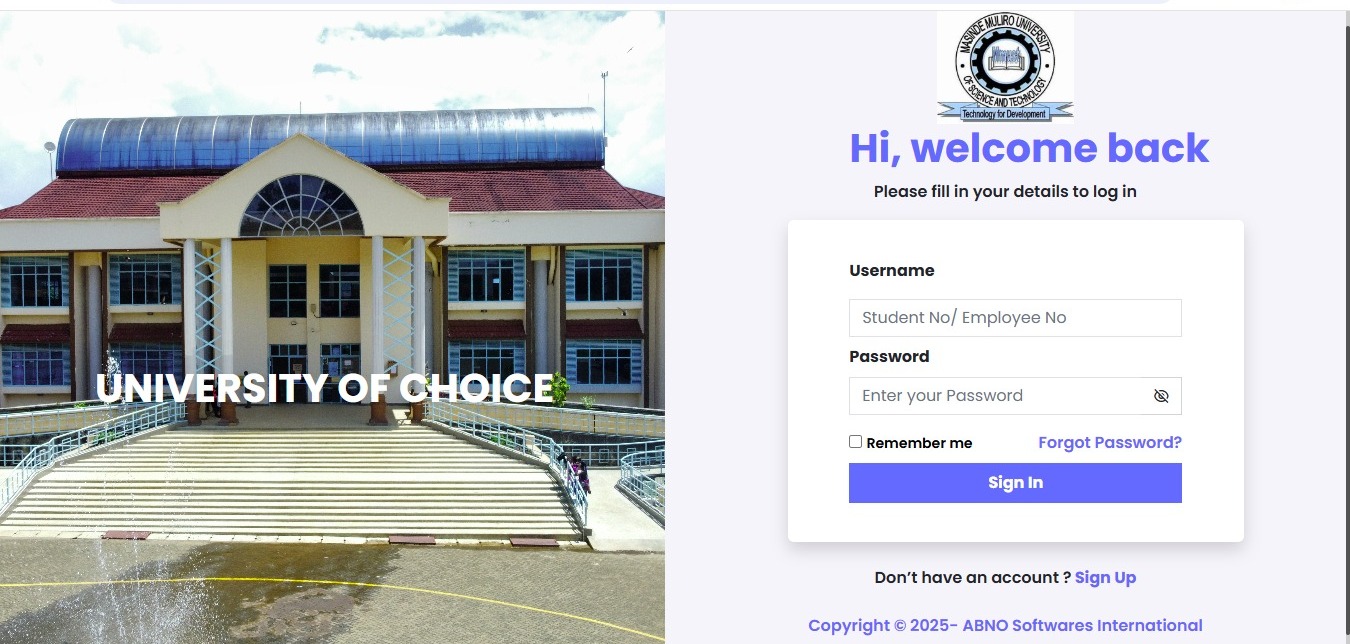
Quick Links-MMUST Student Portal Guide
Here are the essential links and numbers you’ll need:
- Official Student Portal: portal.mmust.ac.ke
- Admission Portal: admission.mmust.ac.ke
- E-Learning (ODEL): elearning.mmust.ac.ke
- Fee Payment Paybill: 7857014 (Account No = Your Registration Number)
- Hostel Booking: Usually opens in August (first-come, first-served basis)
If you are a student at Masinde Muliro University of Science and Technology (MMUST), you already know that campus life can be both exciting and stressful. From registering units to paying fees, booking hostels, or checking your results, there are so many administrative tasks that need attention. Long gone are the days when you had to spend hours queuing at the finance office or registrar’s block in Kakamega. Today, the MMUST student portal is your lifeline.
This guide is your ultimate companion for everything related to the MMUST student portal. Whether you are a first-year fresher or a continuing student, you will find step-by-step instructions, practical tips, and insights to make your life on campus smoother.
Pro Tip: Keep your registration number handy. You will need it for almost every portal function.
Introduction: Why the MMUST Portal Matters
Let’s be honest. Standing in long queues at the finance office, registrar’s block, or hostel office is nobody’s idea of fun. Whether you are paying fees, registering units, or booking a hostel, it’s stressful—especially when exam season approaches.
The MMUST portal is designed to streamline all these processes digitally. From checking your results to paying fees via M-Pesa or booking your hostel room, it allows you to manage your academic life without leaving your dorm or home.
But while the portal is convenient, it can also feel overwhelming if you are not familiar with it. This guide will walk you through every aspect of using the portal successfully, so you don’t waste time or risk mistakes.
What is the MMUST Student Portal?
The MMUST student portal is a web-based platform for students, staff, and applicants. It connects you directly to the university’s database so you can:
- Check results and download transcripts
- Register units for your courses
- Pay fees via M-Pesa or bank deposits
- Book hostel rooms
- Access e-learning materials
Think of it as your digital university office—everything you would normally need to do in person can now be done online.
Why You Need the Portal
Before coming to campus, check if you can do these tasks online:
- ✅ Register Units: You cannot sit for exams without registering your units.
- ✅ Check Results: Access transcripts and provisional results immediately after release.
- ✅ Check Fee Balances: Know exactly how much you owe before the exam period.
- ✅ Book Hostel: Secure a room in Hall 1, 2, 3, or 4 before they fill up.
- ✅ Apply for Deferment: If you need academic leave for any reason.
Tip: The portal ensures you are in control of your academic and financial life. Use it proactively, not reactively.
Key Features and Services
The MMUST portal is more than a login page. Here’s a breakdown of its main features:
1. Academic Services
This is the core of the portal. Through the academic section, you can:
- View your curriculum: Know what units you are expected to take each semester.
- Register for exams: Essential for sitting exams.
- Download exam cards: Always print and carry them during exams.
- Track academic progress: Check which units you have completed and what is pending.
Note: Units not registered on the portal mean you are technically not in class.
2. Financial Management
The portal lets you manage your finances effectively. Here’s what you can do:
- Generate fee statements: See exactly how much HELB, parents, or you have paid.
- Track pending balances: Avoid surprises during exam periods.
- Pay fees digitally: Both banks and M-Pesa are accepted.
This eliminates guesswork and ensures your account is always up to date.
3. Accommodation (Hostels)
Hostel booking can be competitive, especially for Hall 1 (female) and Hall 2 (male). The portal allows you to:
- Book rooms online: Avoid long queues at the hostel office.
- Select preferred halls: Hall 4 is premium/mixed, Hall 1 and 2 are standard.
- Confirm payments: Booking is tentative until you pay the hostel fee.
Tip: Be fast. Rooms fill up quickly, especially at the start of the academic year.
4. E-Learning Integration (ODEL)
The portal links closely with ODEL (Open, Distance, and e-Learning). Through ODEL, you can:
- Access lecture notes
- Submit assignments
- Track assignment deadlines
- Attend online classes
This integration ensures you can manage both administrative and academic tasks from one platform.
How to Login and Register Units
Step 1: First-Time Account Activation
If you are a new student, you first need to activate your account:
- Visit portal.mmust.ac.ke
- Click Create Account
- Enter your registration number (e.g., AAA/0000/2025)
- Enter your valid email address
- Check your email for the password setup link and follow instructions
Without this, you won’t be able to access the portal.
Step 2: Logging In
- Return to the portal homepage
- Enter your registration number as username
- Enter your new password
- Click Login
Pro Tip: Save your password securely on your phone or a password manager.
Step 3: Registering Units
- Navigate to Academics → Course Registration
- Select the current semester (e.g., Sept–Dec 2025)
- Tick the boxes for the units you are taking (core and electives)
- Click Submit
- Print the registration slip and keep it safe
Forgetting to submit can prevent you from sitting exams, so double-check!
Step 4: Resetting Your Password
If you forget your password:
- Click Forgot Password on the login screen
- Follow the email instructions to reset
- Visit the ICT office if email reset fails
MMUST Fee Payment and Financials
Managing your fees properly is critical. Here’s a complete breakdown.
Accepted Payment Methods
- Bank Accounts:
- KCB: 1101922109
- Equity Bank: 0500294636103
- National Bank: 01003070554000
- M-Pesa Paybill:
- Go to M-Pesa → Lipa na M-Pesa → Paybill
- Business Number: 7857014
- Account Number = Your registration number
- Enter the amount → PIN → Send
Always double-check your registration number to avoid delays.
Estimated Fees 2025/2026
| Program | Tuition Per Year (Ksh) | Notes |
|---|---|---|
| GSSP | 16,000–30,000 | Depends on program & HELB |
| PSSP | 120,000–200,000 | Varies by Science/Arts courses |
| Hall 1–3 | 10,000 | Per Academic Year |
| Hall 4 | 16,000 | Per Academic Year |
Many students also take side hustles or online jobs to help cover costs.
Common Fee Mistakes
- Using the wrong account number for payments
- Waiting until the last minute to pay fees
- Ignoring bank or M-Pesa confirmation messages
Always save receipts or transaction confirmations.
Hostel Booking Guide
Booking a hostel room is crucial for convenience, safety, and affordability.
Steps to Book a Room
- Wait for official announcements (via portal or memo boards)
- Log in to the portal
- Go to Hostel Booking
- Select your preferred hall
- Click Book Room and pay immediately
Mental Checklist:
- Inside campus: cheaper, close to lectures, strict rules
- Rentals/Kefinco: more freedom, higher cost, security varies
Tips for Hostel Life
- Arrive early when booking opens
- Follow hostel rules to avoid penalties
- Network with roommates for a smooth campus experience
Common Mistakes to Avoid
- Wrong registration number during payment
- Sharing your password
- Waiting until exam week to register units
- Ignoring the official .ac.ke email for important communications
Future of University Portals
Kenya’s universities are increasingly digitizing:
- Mobile apps: Dedicated apps for registration and notifications
- AI grading systems: Instant grading for some exams
- Digital ID cards: Replacing physical IDs
Staying up to date with tech changes can make campus life much easier.
My Personal Experience
I once forgot to print my exam card for a Communication Skills exam. Password reset failed, and I had to rush to the IT office at the admin block. I arrived 30 minutes late, panicked, and stressed.
Lesson: Always print your exam card early and memorize your password!
FAQ
Q: How do I reset my portal password?
A: Click Forgot Password. A link will be sent to your student email.
Q: What is the MMUST Paybill number?
A: 7857014. Account Number = your registration number.
Q: Can I register units after the deadline?
A: Usually no. Late registration incurs a penalty. Consult the Registrar if necessary.
Q: Why does my portal show a fee balance after payment?
A: Bank payments may take 24–48 hours to reflect. Bring your receipt to Finance for reconciliation.
Conclusion
The MMUST portal is your lifeline at university. From paying fees to booking hostels and checking results, it helps you manage your academic life without stress. Bookmark the portal, keep your login details safe, and use it proactively.
Have you had a portal login crisis? Share your experiences in the comments below!
Sources and References
- MMUST Official Website
- Kenya National Bureau of Statistics (KNBS): Education Statistics
- Nation Africa: Higher Education News
- Standard Media: University Grading Systems
- Commission for University Education (CUE): University Guidelines

