Quick Answer: How to Access NEMIS Login
Visit nemis.education.go.ke and use your assigned username (usually a 4-character school code or staff ID) and password. Parents receive login credentials from their child’s school. The portal is available 24/7 for tracking student records, performance, and managing education data across Kenya.
Introduction
Picture this: You’re a parent in Nairobi trying to check your child’s school records, or maybe you’re a teacher in Kisumu needing to update student information. Just a few years ago, this meant piles of paperwork and multiple trips to the school office. Today, the NEMIS login portal has changed everything.
The National Education Management Information System is a web-based portal developed by Kenya’s Ministry of Education to collect, manage, and analyze education data for informed decision-making and effective resource allocation. Whether you’re a parent, teacher, school administrator, or education official, understanding how to use the NEMIS login system is now essential for managing educational records in Kenya.
This guide walks you through everything you need to know about accessing and using the NEMIS portal effectively.
What is NEMIS Portal?
NEMIS is a website launched by the Ministry of Education Kenya in 2018 that automates end-to-end management of education data and the associated administrative functions. Think of it as a digital filing cabinet that stores every piece of information about Kenya’s education system in one secure location.
The platform collects, provides, and analyzes real-time data used for making key decisions in education. The NEMIS database stores all entities related to education, including information about students, teachers, principals, schools, educational offices at both zonal and provincial levels and even the Ministry of Education itself.
Here’s what makes NEMIS special:
Centralized Data Hub: All education records from nursery to university are stored in one system, making it easy to track a student’s complete academic journey.
Real-Time Updates: Changes made in the system are instantly available to authorized users across the country.
Transparent Operations: The system increases accountability in how resources are distributed and used in schools.
Unique Identification: NEMIS generates a Unique Personal Identifier (UPI), a unique six-character code that will be used at every stage of the learner’s education for identification and reference.
Why Kenyans Need NEMIS Login Access
The NEMIS portal isn’t just another government website. It’s become a critical tool that touches everyone involved in education. Here’s why:
For Parents:
- Track your child’s academic progress from anywhere
- Monitor attendance records without calling the school
- Verify your child is enrolled in a recognized institution
- Access records needed for bursary applications
- Update contact information when you move
For Teachers and School Administrators:
- Submit enrollment reports with just a few clicks instead of endless paperwork
- Manage student admissions digitally
- Track staff qualifications and assignments
- Report on school infrastructure and resources
- Process student transfers between schools quickly
For Education Officials:
- Make data-driven decisions about resource allocation
- Identify schools that need more teachers or classrooms
- Plan educational programs based on real-time enrollment data
- Combat fraud through accurate record-keeping
- Monitor the implementation of education policies
A senior teacher at Alliance High School explained that NEMIS helps parents stay informed, for example, when applying for a bursary, a parent in Bungoma can easily use the learner’s Unique Personal Identifier (UPI) to confirm eligibility.
Types of NEMIS Portal Users
The NEMIS login system serves different users with varying levels of access:
Parents and Guardians
Parents can view their child’s education records after receiving login credentials from the school. You’ll see attendance records, performance reports, and basic student information. However, parents cannot make changes to student data.
Teachers
Teachers access NEMIS to manage classroom information, submit progress reports, and update student records. Your username is usually your staff ID or a designated code, provided by your school administration.
School Administrators
Headteachers and principals have broader access. They can register new students, admit learners, manage staff data, submit reports to the Ministry, and handle student transfers.
Ministry Officials
Education officers at county, sub-county, and national levels have comprehensive access to view and analyze education data across multiple schools and regions.
Development Partners
Organizations supporting education initiatives can access aggregated data to inform their programs and measure impact.
How to Access NEMIS Login Portal
Getting into the NEMIS system is straightforward if you follow these steps:
Step 1: Open Your Web Browser
Launch any modern browser like Google Chrome, Mozilla Firefox, Safari, or Microsoft Edge. Chrome typically works best with the NEMIS portal.
Step 2: Visit the Official Website
Type nemis.education.go.ke in your address bar. Make sure you’re on the correct official site. Avoid clicking on suspicious links claiming to be NEMIS portals.
Step 3: Select Your User Type
On the login page, you’ll see different tabs for various users. Click the appropriate tab based on your role:
- Parent tab for guardians
- Teacher or School Administrator tab for education staff
- Ministry tab for education officials
Step 4: Enter Your Credentials
Username: This is your unique NEMIS identifier. For school logins, this is usually a four-character official username assigned to you. Parents receive their username from their child’s school, while teachers typically use their staff ID.
Password: Enter the password associated with your username. Passwords are case-sensitive, so check your caps lock key.
Step 5: Click Login
After entering your details correctly, click the “Login” button. You’ll be redirected to your personalized NEMIS dashboard where you can access various features.
Understanding the NEMIS Dashboard
Once logged in, your dashboard provides access to different modules depending on your role:
Institutions Module
This section manages school data including infrastructure, resources, contact information, and school codes. Administrators can update facility details and report on school conditions.
Learners Module
The learners module facilitates student registration, tracks performance, and monitors student progress. You can register new students, view enrollment lists, update student information, and track academic performance.
Staff Module
Contains comprehensive data on teaching staff including qualifications, areas of expertise, teaching assignments, and responsibilities. Schools use this to manage their workforce and report staffing needs.
Finance Module
The finance module captures the income and expenditure of an institution, including fees, capitation, income returns, development funds, and expenditure returns. This promotes financial transparency and accountability.
NEMIS Registration Process Guide
How to Register a School on NEMIS
Step 1: Log in using your institutional credentials or create an account if you’re a new institution.
Step 2: Navigate to the “Institutions Module” on the main menu.
Step 3: Select “Institutional Registration” from the options.
Step 4: Fill in the required information:
- School name and type
- Location details (county, sub-county, ward)
- Contact information (phone, email, postal address)
- Infrastructure details (classrooms, laboratories, libraries)
- Available resources and facilities
Step 5: Review all information for accuracy, then submit.
Step 6: After the school is registered, it gets a unique UPI number, which is important for all future communication with the NEMIS system. Save this number securely.
How to Register Students on NEMIS
The procedure for registering pupils in the Kenya primary school NEMIS portal login system can be a bit complicated because the learners are not yet in the system, and their details need to be captured from scratch. Here’s how to do it:
Step 1: Log in with your institution’s credentials.
Step 2: Click on the “Learners” module from your dashboard.
Step 3: Select “Registration” tab (not admission – that’s different).
Step 4: Enter student details accurately:
- Full names as they appear on the birth certificate
- Birth certificate number (mandatory)
- Date of birth in the correct format
- Gender
- Nationality
- Grade/Class
- Parent/guardian contact information
- Any special needs or conditions
Step 5: Upload a clear passport-sized photo of the student.
Step 6: Review all entries carefully, correct any mistakes, then save the information to generate the student’s UPI number.
How to Admit Students on NEMIS
Admitting a student is different from registering them. This process is for students transferring from other schools:
Step 1: Access the NEMIS login portal and sign in.
Step 2: Navigate to the ‘Admit Student’ section under the ‘Learner’ tab.
Step 3: Enter the student’s KCPE Index number or UPI number.
Step 4: The system will retrieve and display the student’s information.
Step 5: Verify that the details match what you have on record.
Step 6: Click the “ADMIT” button to enroll the student in your institution.
Step 7: Update any necessary information like the parent’s current contact details.
Understanding UPI Numbers in NEMIS
What is a UPI Number?
A UPI (Unique Personal Identifier) is a distinct number assigned to each student upon registration in the NEMIS portal. Think of it like a digital fingerprint for students in Kenya’s education system.
The six-character UPI is an inaugural measure to hinder the occurrence of fake certificates, curb the theft of public funds through ghost teachers and check the exaggerated student enrollment figures. It works similarly to how KRA’s PIN tracks your tax records throughout your life.
Why UPI Numbers Matter
The UPI number follows a student throughout their entire academic journey from nursery to university. Schools use it to track enrollment, performance, and progression. It helps verify student identity for national exams, prevents duplicate registrations across schools, and supports accurate resource allocation from the government.
Is UPI the Same as Assessment Number?
No, they’re different. Each student taking KNEC exams receives a Unique Personal Identification (UPI) number which could be a NEMIS UPI number issued by the Ministry of Education or an assessment number from KNEC for those without a NEMIS number.
How to Get a UPI Number
When a school registers a student in NEMIS with all required information including birth certificate details, the system automatically generates a unique UPI number. Parents receive this number from the school and should keep it safe for future reference.
Cost of Using NEMIS Portal
Good news for everyone: accessing the NEMIS login portal is completely free of charge. There are no fees for:
| Service | Cost |
|---|---|
| School registration | Free |
| Student registration | Free |
| Parent access | Free |
| Teacher access | Free |
| Viewing records | Free |
| Updating information | Free |
| Generating UPI numbers | Free |
The only real cost is having reliable internet access to use the online portal. Schools might need to invest in computers and internet connectivity if they don’t already have them.
Important Warning: Be cautious of anyone asking you to pay for NEMIS services. The Ministry of Education does not charge for NEMIS access. If someone demands payment, report them immediately.
Step-by-Step: Common NEMIS Tasks
How to Update Student Information
Keeping student records current is crucial. Here’s how to make updates:
- Log into NEMIS with your school credentials
- Go to the “Learner” tab
- Select “View my learners”
- Choose the student’s class/form
- Once the NEMIS registration page loads, you can edit almost everything, including the learner’s name
- Make necessary changes
- Scroll down and click “Save Basic Changes”
How to Transfer a Student
The NEMIS portal simplifies student transfers and record updates, ensuring seamless transitions between schools. The sending school initiates the transfer using the student’s UPI, and the receiving school can approve the transfer online, reducing paperwork.
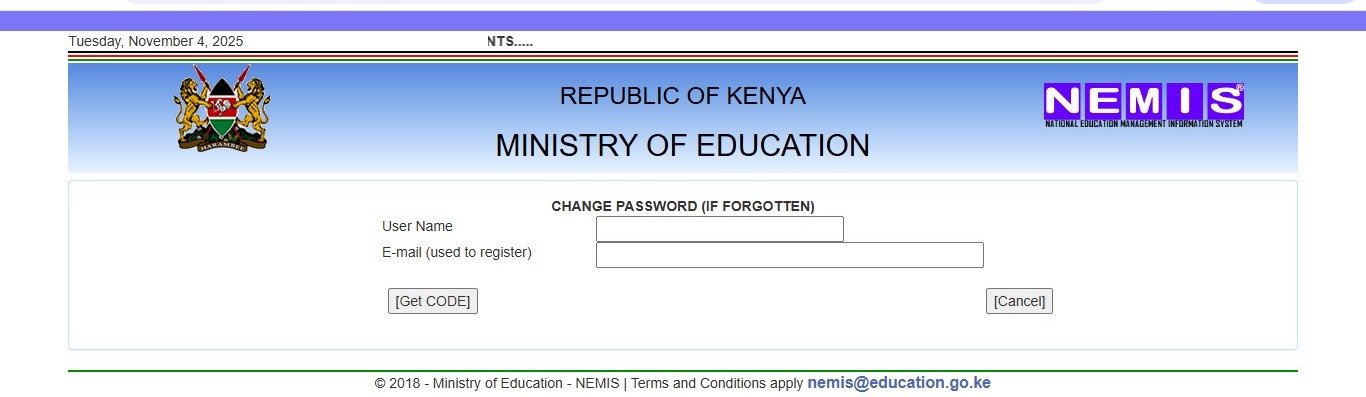
How to Reset Your Password
Forgot your password? Don’t worry:
- Go to the NEMIS login page
- Click “Forgot Password?”
- Follow the password recovery steps
- Answer security questions or check your registered email
- Create a new password
- Note: You can only reset once every 24 hours
Common NEMIS Login Problems and Solutions
Problem 1: Can’t Access the Portal
Possible Causes: Wrong website URL, poor internet connection, browser issues
Solutions:
- Verify you’re using nemis.education.go.ke
- Check your internet connection
- Try a different browser (Google Chrome works best)
- Clear your browser cache and cookies
- Disable browser extensions temporarily
Problem 2: Incorrect Username or Password
Solutions:
- Double-check your login details (passwords are case-sensitive)
- Ensure caps lock is off
- Verify you’re using the correct username format
- Contact your school administrator for credential verification
- Use the password reset option if needed
Problem 3: Page Loading Slowly
Teachers often struggle to access the platform, especially during data entry periods, with login issues because of poor internet or system overload.
Solutions:
- Avoid peak times (early morning or late afternoon)
- Use a wired internet connection instead of Wi-Fi
- Close unnecessary browser tabs
- Try accessing during off-peak hours
Problem 4: Can’t Find Student Records
Solutions:
- Verify you’re entering the correct UPI or index number
- Check if the student is registered in the system
- Ensure you’re searching in the right class/grade
- Contact the previous school if it’s a transfer student
Problem 5: Upload Errors
Solutions:
- Ensure photos are in JPEG or PNG format
- Keep file sizes under 2MB
- Use clear, passport-sized photos
- Check that dates are in the correct format (DD/MM/YYYY)
Tips for Successful NEMIS Login Use
Keep Credentials Safe: Store your username and password securely. Don’t share them with unauthorized people.
Use Updated Browsers: Keep your web browser updated for better security and compatibility.
Regular Updates: Make it a habit to update student and staff information regularly, not just at the end of term.
Verify Before Submitting: Always review information before saving it. Correcting errors later takes more time.
Document Everything: Keep physical copies of important UPI numbers and registration confirmations.
Prepare Data First: When dealing with multiple students, organize information in an Excel sheet before logging in to save time.
Use Chrome Browser: Many users report better performance with Google Chrome.
Check Date Formats: Ensure date formats in your files match NEMIS requirements (M/D/Y format).
Future of Education Management in Kenya
Kenya’s education sector recorded a dramatic expansion in 2024, with the total number of basic learning institutions jumping by 38.8 percent to 129,463, up from 93,281 in 2023. This massive growth makes systems like NEMIS even more critical.
The government continues improving the platform with new features. Future developments may include mobile app access for easier use on smartphones, integration with other government systems like eCitizen, enhanced analytics for better education planning, and improved reporting features for schools.
University enrollment rose by 9.0 percent to 631,300 students in 2024/25, with female enrollment growing by 13.8 percent to 284,500. These growing numbers show why efficient education management systems matter.
As Kenya’s education system expands, the role of NEMIS in maintaining order, transparency, and efficiency becomes more important. The portal represents a shift toward data-driven decision-making in education.
For more opportunities in the digital space, check out available online jobs in kenya that can help you earn while managing educational responsibilities.
Frequently Asked Questions About NEMIS Login
Q: Can parents access NEMIS directly?
A: Yes, parents can access NEMIS using credentials provided by their child’s school. However, they have limited viewing rights and cannot modify student information.
Q: How long does it take to get a UPI number?
A: The UPI number is generated automatically once student registration is completed and saved in the system. This happens instantly.
Q: What if my child’s birth certificate number is incorrect in NEMIS?
A: Contact your school administrator immediately. They can log in and correct the birth certificate number before saving the updated information.
Q: Can I use NEMIS on my phone?
A: Yes, the NEMIS portal is accessible through mobile browsers, though the desktop version offers better functionality. Make sure you have a stable internet connection.
Q: Is NEMIS available 24/7?
A: Yes, the portal is accessible anytime. However, the system may experience high traffic during peak registration periods, which can slow response times.
Q: What happens if my school hasn’t registered on NEMIS?
A: Through NEMIS, each institution of learning will be issued a mandatory unique four-character identifier, and any school that has no unique code shall be deemed not to be existing. Contact your local education office for help with registration.
My Experience with NEMIS Portal
When I first heard about NEMIS back in 2019, I’ll admit I was skeptical. Another government digital platform? Would it actually work? I’m a parent of two kids in primary school in Nairobi, and I’d spent years collecting report cards and attendance slips in manila folders.
Fast forward to 2023, and I can’t imagine going back to the old system. Last year, when we were applying for a county bursary for my eldest daughter, I needed to prove her enrollment and academic performance. Instead of making three trips to the school (you know how it goes – first trip they say “come tomorrow”, second trip “the headteacher isn’t in”, third trip you finally get what you need), I simply logged into NEMIS.
Within minutes, I had her complete academic record, UPI number, and enrollment confirmation. The bursary office accepted the NEMIS printout without question. That experience alone saved me a full day of work and endless frustration.
What I appreciate most is the transparency. I can see my children’s attendance records updated weekly. When my son was marked absent on a day I knew he was in school, I immediately contacted his teacher. It turned out to be a simple registration error that was corrected the same day. Before NEMIS, I might not have noticed until the end of term.
The system isn’t perfect. Sometimes it’s slow during peak periods, and I’ve had to help older teachers in our school community figure out how to use it. But the benefits far outweigh these minor inconveniences. NEMIS has brought accountability and efficiency to Kenya’s education system in ways I never thought possible.
Conclusion
The NEMIS login portal has changed how Kenya manages education data. From parents tracking their children’s progress to administrators making informed decisions about resources, this system touches everyone in the education sector.
Understanding how to access and use the NEMIS portal isn’t optional anymore – it’s essential. Whether you’re registering a new student, updating records, or simply checking academic progress, the system provides tools that make education management more efficient and transparent.
Remember that the official NEMIS portal is at nemis.education.go.ke and all services are free. Keep your login credentials secure, update information regularly, and don’t hesitate to contact your school or the Ministry of Education helpdesk if you encounter problems.
The future of education in Kenya is digital, and NEMIS is leading the way. By embracing this system, we’re building a more organized, accountable, and effective education sector for our children.
Ready to explore more opportunities? Visit online jobs in Kenya to find flexible work options that fit around your schedule.
Have questions about NEMIS login or want to share your experience? Drop a comment below. We’d love to hear how the system has impacted your interaction with Kenya’s education sector.
Key Takeaways
- NEMIS login portal at nemis.education.go.ke provides free access to Kenya’s education management system
- Every student receives a unique UPI number that tracks their academic journey from primary to tertiary education
- Parents, teachers, administrators, and education officials can all access NEMIS with different permission levels
- The system handles school registration, student enrollment, staff management, and financial tracking
- Common issues like forgotten passwords, login errors, and slow loading can be resolved with simple troubleshooting
- NEMIS has improved transparency, efficiency, and accountability in Kenya’s education sector
- All NEMIS services are free – be cautious of anyone demanding payment
Sources and References
- Kenya National Bureau of Statistics. (2025). Economic Survey 2025. Retrieved from https://www.knbs.or.ke/
- Ministry of Education, Kenya. (2018). National Education Management Information System Documentation. Jogoo House B, Harambee Avenue, Nairobi.
- UNESCO Institute for Statistics. (2024). Kenya Education Statistics. Retrieved from https://data.worldbank.org/indicator/SE.PRM.ENRL?locations=KE
- Teachers Service Commission, Kenya. (2024). Teacher Management and Deployment Reports.
- Kenya National Examinations Council. (2024). Assessment and Examination Data.
- World Bank Group. (2024). Kenya Education Indicators. Retrieved from https://datatopics.worldbank.org/education/country/kenya
- Business Daily Africa. (2025). Kenya’s Education Sector Expansion. Retrieved from https://www.businessdailyafrica.com/
Contact Information:
Ministry of Education
- Location: Jogoo House B, Harambee Avenue, Nairobi County, Kenya
- Phone: +254-020-3318581
- Email: cs@education.go.ke
NEMIS Helpdesk
- Phone: +254-020-3318581
- Email: nemis@education.go.ke
For more educational resources and career opportunities, visit trusted platforms like HubSpot’s educational blog and Entrepreneur.com for insights on digital transformation in education.