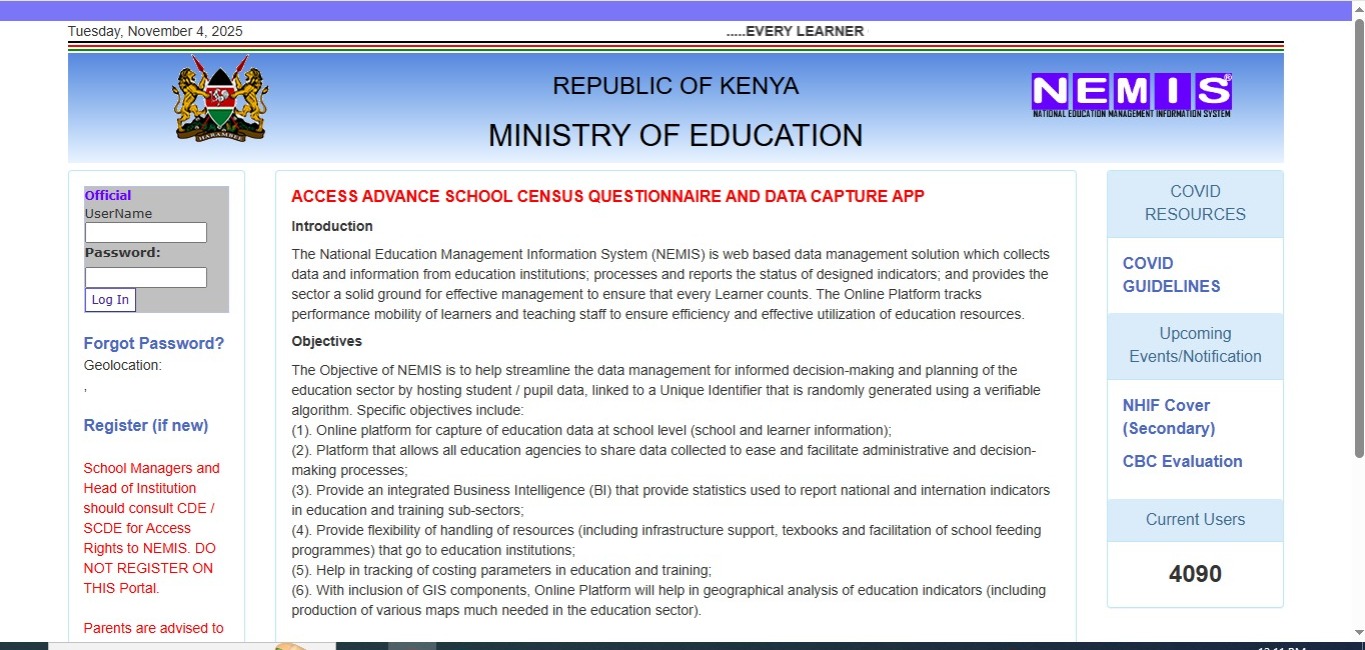
Quick Answer: What You Need to Know About NEMIS Portal
If you’re a parent, teacher, or school administrator in Kenya, you need quick answers about the NEMIS portal. Here’s what matters most:
Login Time: 2-3 minutes with proper credentials
UPI Number Generation: Automatic upon student registration
Access URL: nemis.education.go.ke
Cost: Completely free for all users
Users: Over 120,000 institutions registered
The nemis portal is your gateway to managing education data in Kenya. Whether you’re registering a new student or tracking academic progress, this system has transformed how we handle education information across the country.
What is the NEMIS Portal?
Think of the nemis portal as Kenya’s digital filing cabinet for all education records. The National Education Management Information System is a web-based portal developed by Kenya’s Ministry of Education to collect, manage, and analyse education data for informed decision-making and effective resource allocation.
Launched in 2018 with an $88 million grant from the Global Partnership for Education, NEMIS is a game-changer in educational data management. Before NEMIS, schools struggled with paper files that could get lost, damaged, or manipulated. Now, everything’s online and secure.
Here’s what makes the nemis portal special:
For Students: Every student is assigned a Unique Personal Identifier (UPI) number upon registration, which tracks their progress from primary through tertiary education. This six-character code stays with you throughout your entire education journey.
For Schools: Managing thousands of student records becomes simple. You can update information, transfer students, and generate reports with just a few clicks.
For Parents: You can track your child’s performance, attendance, and health records all in one place.
Today, over 120,000 public and private institutions are integrated into NEMIS, marking a significant leap toward achieving Kenya’s Vision 2030 goals for a modernized education sector.
Why the NEMIS Portal Matters for Kenya’s Education
Remember those days when transferring schools meant carrying thick folders of documents? Or when ghost students inflated school numbers to claim extra capitation? The nemis portal has changed all that.
Real Problems NEMIS Solved:
For decades, Kenya’s education system grappled with issues such as fragmented student records, bureaucratic delays, and inefficient funding distribution. Schools operated on manual record-keeping systems, which were prone to errors and manipulation.
Let me paint you a picture. Before NEMIS, here’s what happened:
A student transfers from Nairobi to Mombasa. The previous school sends records by post – they arrive three weeks later, or sometimes never. The new school can’t verify grades, can’t check vaccination records, and can’t see if the student has special needs. Everyone wastes time.
Now? The receiving school logs into the nemis portal, searches the student’s UPI number, and boom – complete history right there.
How NEMIS Benefits Different Users:
School Administrators save hours every week. Headteachers can now submit enrolment reports with just a few clicks, rather than filling out endless paperwork.
Ministry Officials make better decisions. The Ministry of Education uses real-time data to know which counties need more teachers or classrooms.
Parents stay informed about their children’s education without multiple school visits.
Types of Users on the NEMIS Portal
The nemis portal isn’t just for one type of user – it’s built for everyone involved in education. Here’s who uses it and what they can do:
School Administrators and Principals
These are your power users. They handle everything from registering new students to managing teacher information. School heads use the nemis portal to submit enrollment data, track attendance, and manage school resources.
Teachers and Staff Members
Teachers access the nemis portal to update student grades, record attendance, and generate academic reports. The platform is used by school administrators, parents, education officers, and policymakers to access, update, and verify educational records.
Parents and Guardians
While parents can’t directly register on the nemis portal (that’s done through schools), they can request access through their child’s school to view academic performance, attendance records, and health information.
Ministry Officials and County Directors
These officials monitor education data across regions, track resource allocation, and use analytics for policy planning. They have the highest level of access to generate nationwide reports.
KNEC and Examination Bodies
The Kenya National Examinations Council integrates with the nemis portal for exam registration, making KCPE and KCSE registration more efficient.
How to Access the NEMIS Portal: Step-by-Step Login Guide
Getting into the nemis portal is straightforward once you know the steps. Let’s walk through it together.
What You Need Before You Start:
- A computer or smartphone with internet connection
- Your official username (usually four characters)
- Your password
- Chrome browser (works best with NEMIS)
Login Process:
Step 1: Open your web browser and go to nemis.education.go.ke
Step 2: On the homepage, you’ll see different user tabs. Choose yours:
- School administrators click the “Institution” tab
- Parents select “Parent”
- Ministry officials choose “Ministry”
Step 3: Enter your username in the first field
Step 4: Type your password in the second field (remember, passwords are case-sensitive)
Step 5: Click the “Login” button
You’re in! The dashboard will load showing your specific tools and information.
If Login Fails:
Most login problems happen because of these reasons:
Wrong credentials: Double-check your username and password. Remember that your school received these credentials during initial registration.
Account not activated: New accounts need activation. Contact your County Director of Education if you can’t log in.
Browser issues: The nemis portal works best on Chrome. If you’re using another browser, switch to Chrome and try again.
Maintenance downtime: Occasionally, the NEMIS portal may be down for maintenance. Check the Ministry of Education website for announcements.
NEMIS Portal Registration: Complete Guide for 2025
Registration on the nemis portal happens in stages. You can’t just create an account on your own – there’s a specific process that maintains data integrity.
Registering Your School on NEMIS
Schools must register first before adding any students or staff. Here’s what you’ll need:
Required Documents:
- School registration certificate
- Business Permit (for private schools)
- School license from the Ministry
- Principal’s identification documents
- Proof of school location
School Registration Steps:
- Contact your County Director of Education (CDE) or Sub-County Director (SCDE) to request access rights
- Provide all required documents
- Receive your unique four-character school code
- Get your login credentials
- Log in and complete your school profile
You can update your school’s details, ensuring all information is current and accurate. This includes the school’s name, location, and contact information.
Registering Students on the NEMIS Portal
Once your school is registered, you can add students. This is where the magic of the UPI number happens.
For New Students (First Time Registration):
The procedure for registering pupils in the Kenya primary school NEMIS portal login system can be a bit complicated. This is because the learners are not yet in the system, and their details need to be captured from scratch.
Here’s the exact process:
- Log in using your school’s credentials
- Go to the “Learners” module on your dashboard
- Click the registration tab (not admission – that’s different)
- Enter student details:
- Full name as on birth certificate
- Birth certificate number (mandatory)
- Date of birth (format: MM/DD/YYYY)
- Gender
- Nationality
- Parent/guardian ID number
- Parent phone number and address
- Current grade/class
- Special needs (if any)
- Upload a clear passport photo (use phone or digital camera)
- Review all information carefully
- Click save – the system generates the UPI number automatically
For Continuing Students (Already in NEMIS):
If a student transfers to your school and already has a UPI number:
- Log into the nemis portal
- Go to “Learners” tab
- Select “Admit Student”
- Search for the student details in the system: You only need to type in his/her KCPE Index number or UPI number. Once done, tap on the search button
- Review the student’s information
- Click “ADMIT” to enroll them in your institution
The student’s complete academic history transfers automatically. No paperwork needed.
Understanding the NEMIS UPI Number
UPI stands for “Unique Personal Identifier.” It is a unique identification number assigned to each teacher, student, and staff member in the education system in Kenya.
Your UPI number is your educational identity. Think of it like your ID number, but specifically for school. NEMIS generates a Unique Personal Identifier (UPI), a unique six-character code that will be used at every stage of the learner’s education for identification and reference.
Why the UPI Number Matters:
- It follows you from nursery to university
- You use it for KCPE and KCSE registration
- It prevents duplicate records
- Schools use it to transfer your records
- The Ministry tracks your educational progress
This code is crucial and will be sent to you via SMS as part of the registration procedure. Upon entering the code, your NEMIS UPI number will be generated automatically.
Cost of Using the NEMIS Portal
Here’s great news – the nemis portal is completely free for all users in Kenya. The government funds the entire system, so you won’t pay any registration fees, subscription charges, or access fees.
| Service | Cost | Notes |
|---|---|---|
| School Registration | KES 0 | Fully government-funded |
| Student Registration | KES 0 | No charges for UPI generation |
| Portal Access | KES 0 | Unlimited logins |
| Student Transfer | KES 0 | Digital process, no fees |
| Data Updates | KES 0 | Free unlimited updates |
| Password Reset | KES 0 | Self-service available |
What Might Cost You:
While the nemis portal itself is free, you’ll need:
- Internet connection (varies by provider)
- Computer or smartphone access
- Possible printing costs for reports (optional)
Some schools in rural areas might face challenges with electricity and internet connectivity. The Ministry is working on improving infrastructure nationwide to ensure everyone can access the nemis portal easily.
Common Mistakes to Avoid on NEMIS Portal
After working with the nemis portal, I’ve seen people make the same mistakes repeatedly. Learn from others’ experiences:
Wrong Date Format: Use the format MM/DD/YYYY as required by NEMIS. Update your Excel settings to match this format. Entering 15/01/2010 instead of 01/15/2010 will cause errors.
Incomplete Birth Certificate Details: The birth certificate number is mandatory. Birth Certificate Number: Crucial. Contact parents if this is missing. Without it, you can’t generate a UPI number.
Confusing Registration with Admission: New students need registration (creates a new record). Transfer students need admission (imports existing record). Using the wrong option wastes time.
Poor Quality Photos: Blurry or dark photos get rejected. Use good lighting and a plain background. The photo must clearly show the student’s face.
Not Proofreading Before Saving: Once you save, corrections take time. Always double-check names, dates, and numbers before hitting save.
Using Unofficial Registration: NEMIS registration deadlines change every year. To avoid missing the much-needed disbursements from the government, you must register your learns on time. Only register through official channels.
Forgetting Passwords: Write down your credentials securely. Passwords used at registration should be remembered. Should one forget the same, it is possible to get a new one. However, this comes with a limitation; it is only to reset 24 hours after the last reset.
Key Features of the NEMIS Portal Dashboard
Once you log into the nemis portal, you’ll find a dashboard packed with useful tools. Let me show you what each module does:
Institutions Module
This is where all school information lives. You can manage:
- School infrastructure details (classrooms, labs, libraries)
- Utility information (water, electricity, sanitation)
- Co-curricular activities and resources
- School contact information and location
Learners Module
The heart of the nemis portal. Here you’ll:
- Register new students
- Admit transfer students
- Update student biodata
- Track academic performance
- Monitor attendance
- Record health information and vaccinations
- Manage special needs accommodations
Examination Integration – NEMIS links with national exam bodies, making registration for KCPE and KCSE more efficient.
Staff Module
Managing over 300,000 teachers in Kenya is a complex task. NEMIS simplifies this process by digitizing teacher records, ensuring fair deployment, and monitoring professional development.
Teachers can:
- View their deployment information
- Apply for transfers online
- Update professional qualifications
- Track teaching assignments
Finance Module
Critical for tracking school funds:
- Monitor capitation disbursements
- Record income from various sources
- Track development fund projects
- Report expenditure details
- Generate financial reports
NEMIS is expected to enable the Ministry to efficiently and transparently allocate resources to learners to enhance maximum efficiency and value for the Kenyan taxpayer.
How to Transfer Students Using NEMIS Portal
Student transfers have become incredibly simple with the nemis portal. No more courier services or lost documents.
To Release a Student from Your School:
- Log into the nemis portal
- Navigate to the “Learners” tab
- Select “Release Learner” from the dropdown
- Search for the student using their UPI or name
- Click the release option
- Confirm the action
The student immediately becomes available for the receiving school to admit.
To Admit a Transfer Student:
- Get the student’s UPI number from parents
- Log into your school’s nemis portal account
- Go to “Learners” then “Admit Student”
- Enter the UPI number or KCPE index
- Review the complete student record
- Click “ADMIT”
Seamless Transfers – When students transfer from one school to another, their academic records, health details, and disciplinary history move with them.
The entire process takes minutes instead of weeks. Parents appreciate this efficiency, especially during emergency transfers.
Future of NEMIS: What’s Coming in 2025
The education technology landscape in Kenya is changing. Kenya’s Ministry of Education has announced that it will replace the current National Education Management Information System (NEMIS) with a more advanced platform, the Kenya Education Management Information System (KEMIS).
Timeline for KEMIS Rollout:
The pilot phase begins on July 1, 2025, in selected counties. A nationwide registration of all learners will follow on July 15, 2025, with the full transition to KEMIS expected by the end of 2025.
What KEMIS Will Bring:
KEMIS is designed to be a fully integrated platform linking every learner, from Early Childhood Development Education (ECDE) centers to universities, with Maisha Namba, Kenya’s digital ID system.
Don’t worry about your current NEMIS data – the Ministry plans to migrate existing records to the new system. Your UPI numbers will remain valid.
Expected Improvements:
- Mobile app access for parents and teachers
- Better integration with other government systems
- Enhanced security features
- Faster data processing
- More detailed analytics
While change can feel overwhelming, remember that the goal is making education management even better for everyone involved.
Frequently Asked Questions About NEMIS Portal
How do I get a NEMIS UPI number?
You don’t apply for a UPI number directly. When your school registers you on the nemis portal with your birth certificate and other details, the system automatically generates your unique six-character UPI number. This happens instantly upon saving your registration information.
Can parents register their children on NEMIS?
No, parents cannot directly register on the nemis portal. For security reasons, public registration is restricted on the NEMIS portal, and parents cannot register their children directly. This process ensures data integrity and the safe handling of students’ information. Your child’s school handles all NEMIS registration.
What if I forgot my NEMIS password?
Click “Forgot Password” on the login page, enter your username and registered email address, then follow the instructions sent to your email. Remember that you can only reset your password once every 24 hours.
How long does NEMIS registration take?
School registration can take 3-5 business days for approval. Student registration is immediate once you have all required documents. The system generates the UPI number automatically upon saving the student’s information.
Is there a NEMIS mobile app?
Currently, the nemis portal is web-based only. However, with the upcoming KEMIS system, a mobile application will be available for easier access.
What happens if my UPI number gets lost?
Contact your school administrator. They can retrieve your UPI number from the nemis portal using your name and birth certificate number. Keep your UPI number written down in a safe place – you’ll need it for KCPE, KCSE, and future educational transitions.
My Experience with the NEMIS Portal
When I first heard about the nemis portal back in 2018, I’ll admit I was skeptical. Another government digital system? Would it actually work?
I remember visiting my child’s school for a parent-teacher meeting. The headteacher was excited, showing us how they could now track every student digitally. “No more lost files,” she said, clicking through the nemis portal on her laptop.
Fast forward to 2020, when my daughter needed to transfer schools due to our family relocation. I braced myself for weeks of paperwork and back-and-forth trips. Instead, the whole thing took three days. The receiving school searched her UPI number on the nemis portal, saw her complete academic history, and admitted her on the spot. I nearly cried from relief.
What really impressed me was seeing her grades, attendance records, and even vaccination history all in one place. The old system? We’d have needed folders from three different offices.
I’ve also watched teachers at my local school transform their workload. My neighbor, who teaches at a primary school, used to spend entire weekends filling government forms by hand. Now she logs into the nemis portal, clicks a few buttons, and her enrollment report is done. She actually has time for family on weekends now.
Sure, the system isn’t perfect. Internet connectivity in rural areas remains a challenge. Some older teachers struggle with technology. But watching Kenya’s education sector modernize through the nemis portal has been genuinely inspiring. We’re building something that will serve generations of Kenyan students.
Key Takeaways
The nemis portal represents Kenya’s commitment to modernizing education through technology. Here’s what you absolutely need to remember:
- The nemis portal is free for all users – schools, teachers, parents, and students
- Every student gets a unique UPI number that follows them throughout their education journey
- Over 120,000 institutions now use NEMIS, making it the largest education database in Kenya
- Student transfers that once took weeks now happen in minutes
- The system prevents ghost students and ensures transparent resource allocation
- Access is restricted to maintain data security – only schools can register students
- KEMIS will replace NEMIS by end of 2025, bringing even better features
Whether you’re a parent wanting to track your child’s progress, a teacher managing classroom data, or an administrator running a school, the nemis portal provides the tools you need. Yes, there’s a learning curve. Yes, you’ll sometimes face internet challenges. But the benefits far outweigh the difficulties.
The future of Kenyan education is digital, transparent, and efficient. The nemis portal is leading that transformation. Get registered, learn the system, and watch how it makes education management simpler for everyone.
Take Action Today
Ready to start using the nemis portal effectively? Here’s what to do next:
For School Administrators:
- Contact your County Director of Education if you haven’t registered your school
- Organize training sessions for your staff on using NEMIS
- Set aside time each week to update student records
- Back up important data offline as well
For Teachers:
- Ask your school for NEMIS training if you haven’t received it
- Familiarize yourself with the learners module
- Keep student birth certificates handy for registration
- Report any system issues to your ICT coordinator immediately
For Parents:
- Ask your child’s school about accessing their NEMIS records
- Ensure your child is registered with correct birth certificate details
- Keep a record of your child’s UPI number
- Update the school if your contact information changes
Need Help?
If you’re facing challenges with the nemis portal, contact:
Physical Office: Jogoo House B, Harambee Avenue, Nairobi County
Postal Address: PO Box 30040-00100, Nairobi, Kenya
Email: nemis@education.go.ke
Looking for more information about education opportunities in Kenya? Check out online jobs in Kenya for additional resources that can help you grow professionally while supporting your children’s education.
Share Your Story
Have you used the nemis portal? Did this guide help you? Share your experience in the comments below. Your insights help other parents, teachers, and administrators navigate this important system. Let’s build a community of informed users who can support each other through Kenya’s digital education transformation.
Survey Question: How confident do you feel about using the NEMIS portal after reading this guide?
- Very confident – ready to start using it immediately
- Somewhat confident – need to try it first
- Not confident – need more training
- Already using it – found this guide helpful for reference
Leave your answer in the comments, and let’s see how we can support each other better!
Sources and References
This comprehensive guide draws from authoritative sources to ensure accuracy and reliability:
- Tuko.co.ke – NEMIS portal: Login, registration, UPI number, and requirements (https://www.tuko.co.ke/266921-nemis-portal-login-registration-kenya.html)
- Ministry of Education Kenya – Official NEMIS Portal (https://nemis.education.go.ke/)
- Jaymin Cleaning Services – Understanding the NEMIS Portal (https://www.jaymincleaningservices.co.ke/nemis-portal/)
- Marketing.ke – Latest Way to Log into the NEMIS Portal in Kenya (https://marketing.ke/latest-way-to-log-into-the-nemis-portal-in-kenya/)
- Money.ke – How to Log into the NEMIS Portal in Kenya (https://money.ke/nemis-login/)
- Bunifu ERP – All you need to know about NEMIS (https://erp.bunifu.co.ke/2018/02/28/all-you-need-to-know-about-nemis-the-national-education-management-information-system/)
- EDU NOTES – NEMIS Portal: Kenya’s Guide to Login, Registration & Educational Data Management (https://edunotes.co.ke/nemis-portal-login-registration-data-management/)
- Kenyans.co.ke – NEMIS: How to Register & Track Learners’ Performance in Kenya (https://www.kenyans.co.ke/news/41166-nemis-how-register-track-learners-performance-kenya)
- Teachers Updates – NEMIS Portal: Login, Registration, UPI Number, and Requirements (https://teachersupdates.net/nemis-portal-login-registration-upi-number-and-requirements-contacts/)
- TechWeez – KEMIS: Kenya’s New Education Data System Set to Replace NEMIS in 2025 (https://techweez.com/2025/05/16/kemis-kenyas-new-education-data-system-set-to-replace-nemis-in-2025/)
- Kenya Broadcasting Corporation – Gov’t unveils team to create new education data system (https://www.kbc.co.ke/govt-unveils-team-to-create-new-education-data-system-to-replace-nemis/)
These sources include official government portals, respected education news outlets, and verified educational platforms that ensure this guide provides trustworthy, expert-driven information for Kenyan education stakeholders.
About the Author: This guide was researched and written to help Kenyan parents, teachers, and school administrators navigate the NEMIS portal effectively. We’re committed to making education technology accessible to everyone.