Quick Answer: Accessing the Portal
Portal Link: portal.mu.ac.ke
For First Years: firstyear.mu.ac.ke
3 Fast Steps to Login:
-
Go to the official website (mu.ac.ke) or click the direct link above.
-
Enter your Registration Number (e.g., ED/123/21) as your username.
-
Type your password and click “Login.”
Need Help?
-
Forgot Password: Click “Forgot Password” on the login page.
-
Support Email: helpdesk@mu.ac.ke
Introduction
We have all been there. It is the beginning of the semester, and the deadline for course registration is approaching fast. You try to log in to check your exam card, but the system says “Invalid Credentials.” It can be incredibly frustrating.
Managing your university life does not have to be stressful. The Moi University student portal is designed to handle your academic needs from the comfort of your room—whether you are in Eldoret, Nairobi, or at home in the village.
This guide covers everything you need to know about using the portal, from booking that specific room in Hostel H to checking your fee balance before exams start.
Note: Make sure you have a stable internet connection before you start your registration process to avoid errors.
What is the Moi University Student Portal?
Think of the Moi University student portal as your digital office. It is an online platform where the university administration and students exchange important information. Instead of queuing at the administration block for hours, you can access services using your phone or laptop.
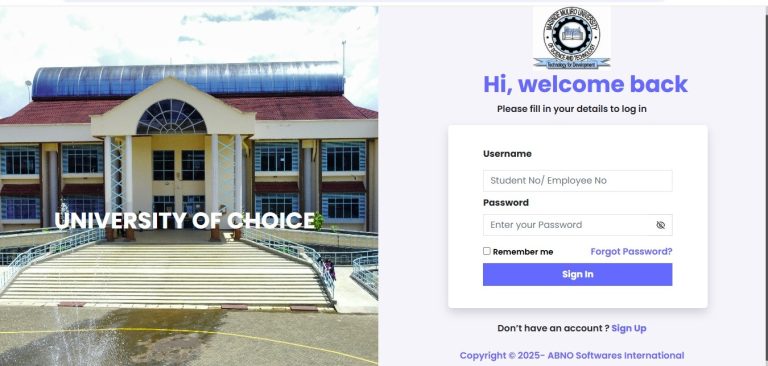
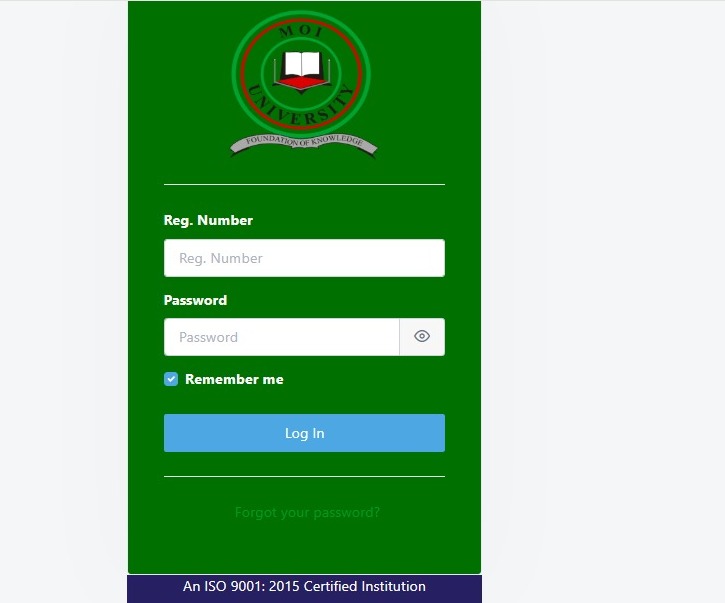
[Image Suggestion: A screenshot of the Moi University Portal Login Page with arrows pointing to the username and password fields.]
Key Functions:
-
Academic Tracking: View your transcripts and missing marks.
-
Financials: Download fee structures and check balances.
-
Accommodation: Book hostel rooms online.
-
Registration: Sign up for units (courses) every semester.
Why Students in Kenya Need This Portal
In the past, students had to travel long distances just to pick up an admission letter or check a missing grade. Today, the portal saves you time and money.
-
Convenience: You can access it 24/7.
-
Accuracy: You see exactly what the finance department sees regarding your school fees.
-
Speed: Hostel booking happens in real-time. If you are slow, you miss the best rooms.
Interactive Checklist: Are You Ready for the Semester?
-
[ ] Have you paid your session fees?
-
[ ] Do you have your portal password ready?
-
[ ] Have you selected your units for the semester?
-
[ ] Is your online job income ready to clear the balance?
Types of Portals at Moi University
While students mostly use the main portal, there are a few others you might encounter.
1. The Main Student Portal (portal.mu.ac.ke)
This is for continuing students. You will use this for 90% of your activities, including booking rooms and checking exam results.
2. The First Year Portal (firstyear.mu.ac.ke)
If you are a “fresher,” this is where you start. You will download your admission letter and update your personal details here before moving to the main system.
3. The Staff Portal
This is strictly for lecturers and non-teaching staff. You won’t need access to this unless you work for the university.
Tip: Always check the URL to ensure you are on the secure, official university site before entering your details.
How to Navigate the Portal Features
Using the portal is simple if you know where to look. Here is how to handle the most critical tasks.
1. Logging In
-
Visit portal.mu.ac.ke.
-
Enter your Registration Number (e.g., BA/101/22).
-
Enter your Password.
-
Click Login.
2. Resetting a Forgotten Password
If you cannot remember your password, do not panic.
-
Click on the “Forgot your password?” link on the login screen.
-
Enter your Registration Number.
-
Select “Email” to have a reset link sent to your student email address.
-
Open your email, click the link, and set a new, strong password.
3. Course Registration
You must register for units to sit for exams.
-
Log in and click “Course Registration” on the dashboard.
-
Select the current Semester and Academic Year.
-
Click “Get Units.”
-
Check the boxes next to the units you are taking.
-
Click “Save” or “Submit.” Always print your exam card afterward!
4. Booking a Hostel
This is often a race against time!
-
Log in and look for the “Accommodation” or “Hostel Booking” tab.
-
Select the hostel you prefer (e.g., Hostel H, K, or M).
-
The system will show available spaces.
-
Click “Book Room.”
-
Important: You usually have a limited time to pay the accommodation fee to secure the room.
Comparison Table: Hostel vs. Rentals
| Feature | University Hostel | Private Rental (Rentals) |
| Cost | Affordable (approx. KES 3,000 – 6,000/sem) | Expensive (KES 3,000 – 10,000/month) |
| Security | University security available | Varies by landlord |
| Convenience | Inside campus | Walk or fare required |
| Privacy | Shared rooms (2-4 students) | Can be private |
Cost of Education: Understanding Fee Structures
The portal does not charge you to use it, but it tells you how much you owe the school. Fees vary depending on whether you are Government Sponsored (GSSP) or Privately Sponsored (PSSP).
Estimated Annual Fee Ranges (2025)
| Program Type | Government Sponsored (GSSP) | Privately Sponsored (PSSP) |
| Arts & Humanities | KES 20,000 – 30,000 | KES 100,000 – 120,000 |
| Science & Tech | KES 35,000 – 50,000 | KES 150,000 – 200,000 |
| Medicine/Law | KES 50,000 – 60,000 | KES 300,000+ |
Note: These figures are estimates. Always download the specific fee structure from the portal under the “Downloads” or “Financials” section for the exact amount.
Interactive Calculator (Estimate)
If you have a fee balance of KES 20,000 and earn KES 5,000 per week from online jobs in Kenya, how long will it take to clear your fees?
(Answer: Approx. 4 weeks)
Step-by-Step Guide: Getting Started Today
Here is a visual progress timeline to help you get sorted for the new semester.
-
Week 1: Log in and check fee balance.
-
Week 2: Pay fees at the bank (National Bank, Co-op, etc.).
-
Week 3: Wait 24-48 hours for the portal to update your balance.
-
Week 4: Register for courses online.
-
Week 5: Download and print your Exam Card.
Common Mistakes to Avoid
Many students face issues because of small errors. Watch out for these pitfalls.
-
Sharing Passwords: Never give your login details to a cyber cafe attendant. They could mess up your registration.
-
Last Minute Rush: Waiting until the deadline to register courses usually leads to system crashes because everyone is logging in at once.
-
Ignoring Fee Arrears: The system will block you from booking hostels if you have a large fee balance from the previous year.
-
Wrong Email Address: Ensure your student email is active; otherwise, you cannot reset your password.
Future Trends in University Portals
Technology in education is moving fast. We might soon see changes that make the Moi University student portal even better.
-
Mobile Apps: A dedicated app that sends push notifications for exam dates.
-
AI Chatbots: An automated assistant on the portal to answer questions like “How much is my fee balance?” instantly.
-
Biometric Login: Using fingerprints or face ID on your phone to log in securely.
Poll: What feature would you like to see most?
-
[ ] Mobile App Integration
-
[ ] Faster Server Speeds
-
[ ] M-Pesa Payment Integration directly on the portal
FAQ Section
Q: How do I check my admission letter on the Moi University student portal?
A: Go to the First Years portal (firstyear.mu.ac.ke), log in with your index number, and look for the “Download Admission Letter” button.
Q: What do I do if the portal is down?
A: Wait for 20 minutes and try again. If it persists for a day, contact the ICT helpdesk at the university or check the university’s social media for updates.
Q: Can I change my hostel room through the portal?
A: Usually, once booked, it is final. However, you can visit the housekeeping department in person to request a swap if there are vacant rooms.
Q: How do I view my exam results?
A: Log in, click on “Academics” or “Transcripts,” and select the academic year you wish to view.
My Experience with the Portal
I remember my second year at university vividly. It was exam week, and I had totally forgotten to print my exam card. I rushed to the cyber cafe at the Student Centre, only to find the Moi University student portal was loading very slowly because thousands of us were trying to access it at the same time.
My heart was pounding. I had an exam in 30 minutes. I kept refreshing the page, sweating. Finally, it loaded! I managed to register the missing unit and print the card just ten minutes before the paper started.
That day taught me a valuable lesson: Never wait until the last minute. Now, I always advise students to log in weeks before exams to ensure their registration is correct. I also started doing online jobs in Kenya to ensure I could pay my fees early and avoid the “fee balance block” on the portal. It makes life so much smoother.
Conclusion
The Moi University student portal is a powerful tool that puts your academic life in your hands. From checking results to securing a place to sleep, knowing how to use it effectively is essential for your survival on campus.
Don’t let technical hitches or forgotten passwords slow you down. Bookmark the login page, keep your password safe, and always register for your courses on time.
Key Takeaways:
-
The portal is your gateway to exams, hostels, and finance.
-
Always use the official link:
portal.mu.ac.ke. -
Resetting your password requires access to your student email.
-
Early registration prevents system errors and stress.
We want to hear from you!
Have you ever faced challenges booking a hostel on the portal? Or do you have a tip for first years? Share your thoughts in the comments below!
Sources and References
For further reading and verification of the information provided, please refer to these credible sources:
-
Moi University Official Website: https://www.mu.ac.ke/
-
Higher Education Loans Board (HELB): https://www.helb.co.ke/
-
Kenya Universities and Colleges Central Placement Service (KUCCPS): https://students.kuccps.net/
-
Social Media Usage in Kenya: Statista
-
Latest Education News: Nation Africa – Business Section
-
Digital Trends: TechCrunch Africa
-
Economic Data: Kenya National Bureau of Statistics (KNBS)
Interactive Answers:
-
Fee Calculator Quiz: If you save KES 5,000 a week, it takes 4 weeks to clear KES 20,000.
-
Checklist: If you checked all boxes, you are 100% ready for the semester!